Search inside your PDFs. All of them. At once.
DocFind indexes an entire library of PDFs — scanned ones too, with on-device OCR — so one search returns every match, ranked, with the page and the sentence around it.
What it does
One search. Every document. Ranked.
Most PDF apps search one open file. DocFind builds a searchable index of everything you add, then hands you the matches — honestly labelled, page by page.
One search, whole library
DocFind builds a searchable index of every document you add, so a single query checks all of them and ranks what it finds.
Scans become searchable
A scanned page is a picture of text — invisible to ordinary search. DocFind's on-device OCR reads it and folds the words into the same index, with OCR-found matches labelled so you always know where a hit came from.
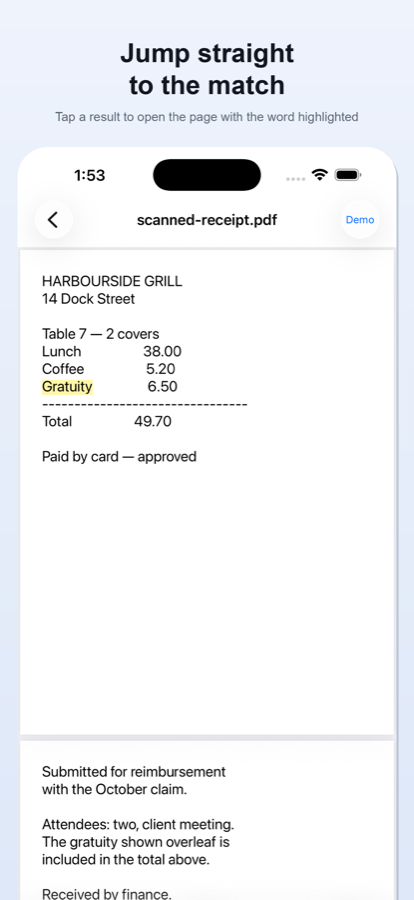
Jump straight to the match
Tap a result to open the exact page with the match highlighted, then step through the other matches in the document.
Index once, keep searching
Libraries persist. After the first indexing pass, every later search reads the index instead of re-reading your documents.
Honest about its limits
DocFind tells you when pages aren't searchable yet, how much OCR work remains, and which results came from recognition rather than the original text.
Accessible by design
Full VoiceOver support, Dynamic Type at every size, light and dark appearance.
See it in action
A quick look inside.
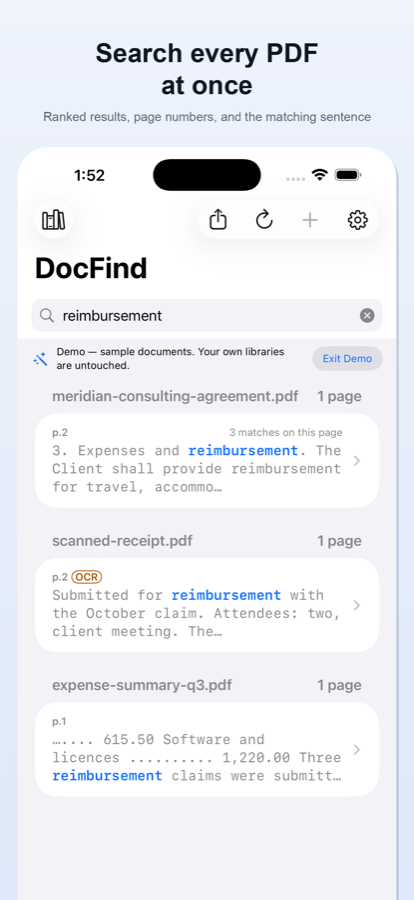
Every match, ranked
One query across the whole library — page numbers and snippets included.
Straight to the page
The match opens highlighted, and you can step through the rest.
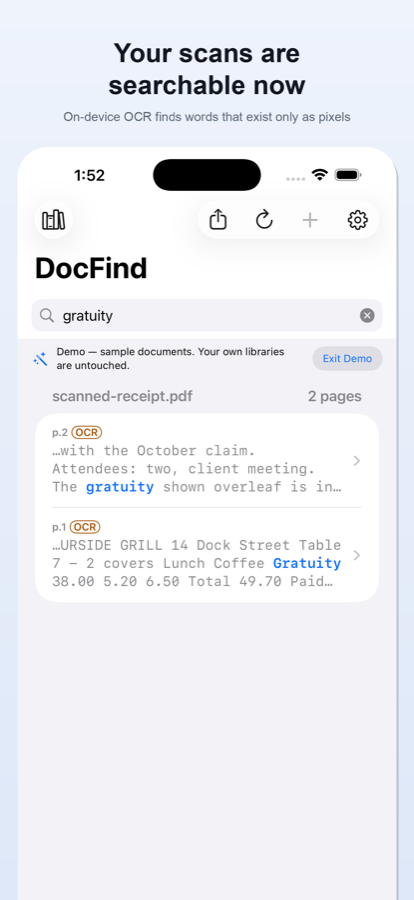
Scans, unlocked
On-device OCR makes scanned pages searchable — results labelled OCR.
How it works
Four steps. DocFind never uploads your documents.
From your first PDF to a highlighted match — every document is read on your device the whole way.
Add your PDFs
Pick documents with your phone's own file picker — DocFind opens only the files you choose, and never asks for your photos, contacts or location.
Index once
DocFind builds a searchable index on your device and tells you which pages are scans that aren't searchable yet.
OCR the scans
One tap runs on-device text recognition — Apple's Vision on iPhone, Google's ML Kit bundled into the app on Android — and folds the recognized words into the same index. Page images are never sent anywhere.
Search and jump
Type once, get every match ranked with its page and snippet, and open it with the found word highlighted.
Privacy
Private, because it has to be.
Searching, indexing, reading scanned pages and exporting all happen on your device, with no internet connection — your documents are never uploaded. On iPhone, DocFind itself contains no networking code — searching, indexing, OCR and export never touch a connection; on Android, DocFind's own code talks to the network only to ask Google Play about purchases, and Google's ML Kit sends Google technical diagnostics — never your documents.
- No accounts, no sign-inThere is nothing to register for and nothing to log in to.
- No ads, no trackingNo advertising SDK, no tracking prompt, no analytics of our own. On Android, Google's ML Kit sends Google technical diagnostics.
- No serversThere is no backend at all. We run nothing you could send a document to.
- On-device OCRApple's Vision on iPhone, Google's ML Kit on Android — both run entirely on your phone.
- Your files, on your termsDocuments open only through the system file picker — the ones you choose.
- Exports leave by your handFiles are saved or shared only when you deliberately send them.
The App Store privacy label reads Data Not Collected. On Google Play, the Data safety section lists App info and performance and Device or other IDs — the diagnostics Google's ML Kit sends, never your documents. Read the full Privacy Policy.
Pricing
Free to search. Pro when you need more.
Complete keyword search is free. DocFind Pro unlocks the rest — monthly, yearly, or a single payment that stays yours.
Free
$0
Complete keyword search, for real, on iPhone and on Android.
- Unlimited searches — every result shown
- One library of up to 25 documents
- OCR on PDFs you import: 10 pages a month on iPhone; on Android, the first 100 pages free, then 10 a month
- 10 exports every month, on your own results
- Built-in demo — sample documents, no setup
Lifetime Unlock Best value
$29.99
lifetime · ₹999 in India · same on iPhone and Android
The lifetime unlock is a one-time purchase and does not renew.
- Unlimited documents and unlimited libraries
- Unlimited on-device OCR
- Unlimited exports — CSV, Markdown, a PDF report, or a new PDF of just the matching pages
- Restorable on your other devices — signed into the same Google Account on Android, or the same Apple Account on iPhone
- iPhoneFamily Sharing — your Pro unlock covers your family group
Pro Yearly
$14.99
per year · ₹799 in India · same on iPhone and Android
Everything in Pro, billed once a year.
- Unlimited documents, libraries, OCR, and exports
- Renews automatically each year until you cancel
- Cancel anytime in your Apple ID settings or Google Play
- Restorable on your other devices — signed into the same Google Account on Android, or the same Apple Account on iPhone
Pro Monthly
$4.99
per month · ₹299 in India · same on iPhone and Android
Everything in Pro, month to month.
- Unlimited documents, libraries, OCR, and exports
- Renews automatically each month until you cancel
- Cancel anytime in your Apple ID settings or Google Play
- Restorable on your other devices — signed into the same Google Account on Android, or the same Apple Account on iPhone
The App Store and Google Play list the same US and India prices. In other countries each store sets your local price, and shows it before you pay. Purchases are handled entirely by Google Play or the App Store — DocFind never sees your payment details. Subscriptions renew until cancelled, and you cancel them in your store's own subscription settings; the one-time purchase does not renew.
Stop scrolling through PDFs. Search them.
DocFind is on the App Store for iPhone, for iOS 17 and later, and on Google Play for Android 7.0 and later.
More apps by Adinand Innovations
Built by the same studio. No ads in any of them.