Search inside your PDFs. All of them. At once.
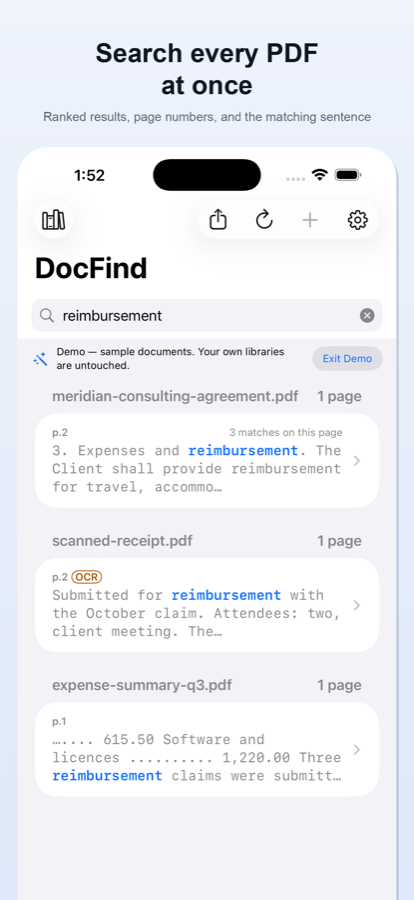
DocFind indexes an entire library of PDFs — scanned ones too, with on-device OCR — so one search returns every match, ranked, with the page and the sentence around it.
What it does
One search. Every document. Ranked.
Most PDF apps search one open file. DocFind builds a searchable index of everything you add, then hands you the matches — honestly labelled, page by page.
One search, whole library
DocFind builds a searchable index of every document you add, so a single query checks all of them and ranks what it finds.
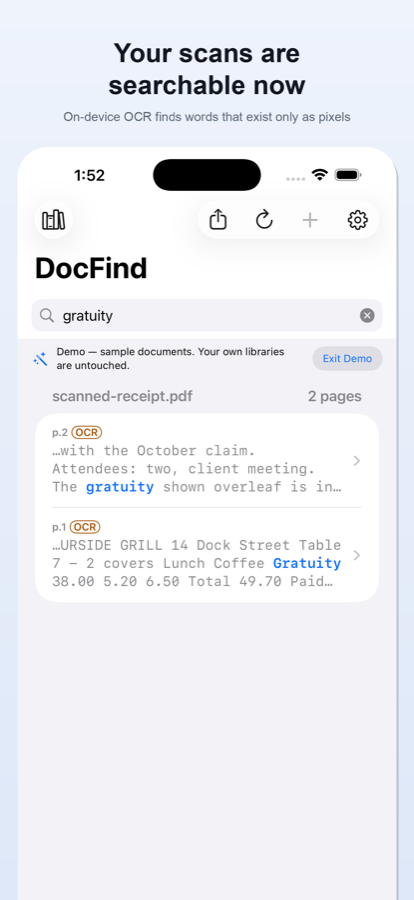
Scans become searchable
A scanned page is a picture of text — invisible to ordinary search. DocFind's on-device OCR reads it and folds the words into the same index, with OCR-found matches labelled so you always know where a hit came from.
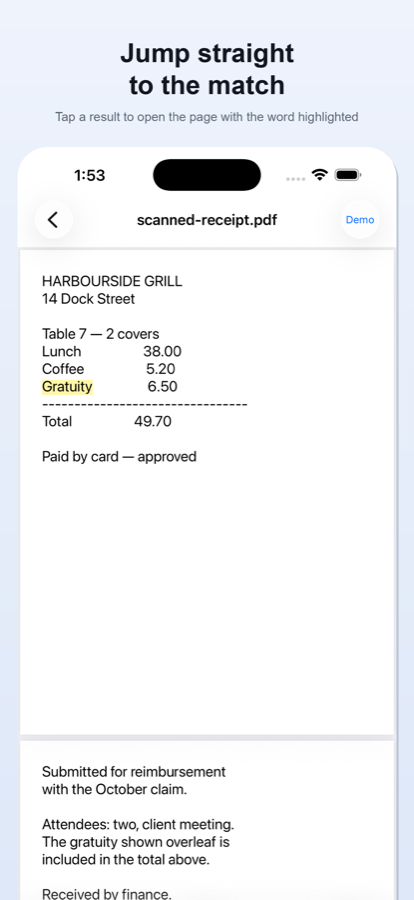
Jump straight to the match
Tap a result to open the exact page with the match highlighted, then step through the other matches in the document.
Index once, search instantly
Libraries persist. After the first indexing pass, every later search is immediate.
Honest about its limits
DocFind tells you when pages aren't searchable yet, how much OCR work remains, and which results came from recognition rather than the original text.
Accessible by design
Full VoiceOver support, Dynamic Type at every size, light and dark appearance.
See it in action
A quick look inside.
Every match, ranked
One query across the whole library — page numbers and snippets included.
Straight to the page
The match opens highlighted, and you can step through the rest.
Scans, unlocked
On-device OCR makes scanned pages searchable — results labelled OCR.
How it works
Four steps. Nothing leaves your phone.
From your first PDF to a highlighted match — with every document staying on your device the whole way.
Add your PDFs
Pick documents with the standard iOS file picker — DocFind opens only the files you choose, and never asks for your photos, contacts or location.
Index once
DocFind builds a searchable index on your device and tells you which pages are scans that aren't searchable yet.
OCR the scans
One tap runs Apple's on-device text recognition and folds the recognized words into the same index. Page images are never sent anywhere.
Search and jump
Type once, get every match ranked with its page and snippet, and open it with the found word highlighted.
Privacy
Private, because it has to be.
DocFind ships with no network capability at all — your documents are never uploaded, because there is nowhere to upload them to.
- No accounts, no sign-inThere is nothing to register for and nothing to log in to.
- No analytics, no ads, no trackingNo analytics SDK, no advertising SDK, no tracking prompt.
- No serversEverything runs on your device — there is no backend at all.
- On-device OCRText recognition uses Apple's Vision framework, entirely on your phone.
- Your files, on your termsDocuments open only through the system file picker — the ones you choose.
- Exports leave by your handFiles leave only via the share sheet, when you deliberately send them.
The App Store privacy label says it plainly: Data Not Collected. Read the full Privacy Policy.
Pricing
Free to search. Pro when you need more.
Complete keyword search is free. DocFind Pro unlocks the rest — monthly, yearly, or a single payment that stays yours.
Free
$0
Complete keyword search, for real.
- Unlimited searches — every result shown
- One library of up to 25 documents
- Five pages of OCR to try on your own scans
- Five exports to try on your own results
- Built-in demo — sample documents, no setup
DocFind Pro
$9.99
per year · or $2.99 monthly · or $19.99 once
Best value. Your store shows your local price.
- Unlimited documents and unlimited libraries
- Unlimited on-device OCR
- Export results as CSV, Markdown, a PDF report, or a new PDF of just the matching pages
- Restorable on your other devices signed into the same App Store account
- Family Sharing — your Pro unlock covers your family group
Purchases are handled entirely by the App Store — DocFind never sees your payment details.
Stop scrolling through PDFs. Search them.
DocFind is coming soon to the App Store for iPhone, iOS 17 and later.